
Beyi Gas Station Management System | Breakdown of Four Core Module Architecture
News 2026年 10月 16日 9
In our previous article, we talked about the common operational troubles that most private gas stations run into: inefficient manual card issuance, messy membership rules, inconsistent fuel sales and cashier accounts, and out-of-sync data on multiple cashier computers during peak hours. To fix these problems, you cannot only focus on the front cashier panel. It is essential to first understand the underlying architecture of the gas station management system.
The Beyi Gas Station Management System adopts a distributed architecture of one server + multiple client terminals. Instead of a single standalone software, it is a complete Internet ecosystem built with four core components: MySQL database, data collection software, server program and application client.
Below we will explain the function, division of labor and data flow of each module, combined with the actual system screenshots.
1. MySQL Database: The Data Warehouse of the Whole Gas Station System
MySQL serves as the data storage hub for the Beyi gas station management system. All business data generated during daily gas station operations will finally be stored in the MySQL database.
It mainly stores these types of data:
- Fuel product archives, tank inventory and nozzle configuration information
- Fueling orders, cashier records and payment logs
- IC card profiles, customer information and recharge records
- Membership points, discount rules and marketing campaign data
- Convenience store goods information, purchase records and stock data
- Shift handover records and financial report data
- Staff accounts, permission settings and operation logs
Simply put: MySQL is the data warehouse of your gas station system. Every fueling operation, cashier transaction and card recharge on the front end will be saved here. When you check reports, reconcile accounts or analyze member consumption later, the system extracts data from this database.
The stability and data integrity of the database directly decide the reliability of the entire gas station management system.

2. Data Collection Software: Messenger Between Fuel Dispensers and System
For stable system operation, the most critical step is to transmit real and accurate fuel dispenser data to the management platform. This task is undertaken by the data collection software.
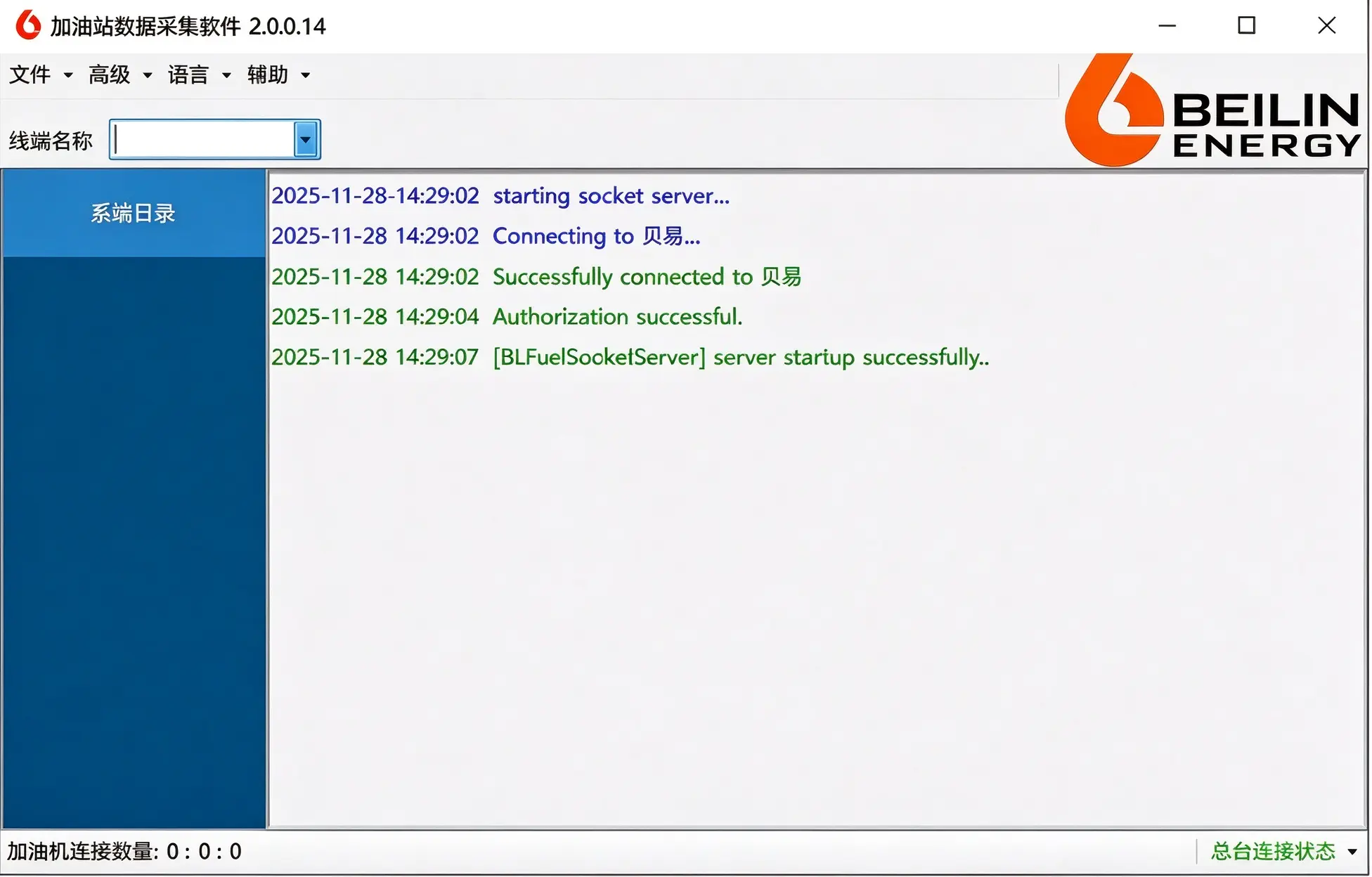
The screenshot below shows the Beilin Energy data collection panel. It displays terminal info, connection logs, startup status, authorization status and the quantity of connected fuel dispensers. Its core responsibilities are:
- Continuously monitor real-time data from Beilin fuel dispensers
- Collect nozzle ID, fuel type, fuel volume, amount and nozzle status information
- Upload collected fueling data to the server for further processing
- Record connection logs for troubleshooting communication faults
If the collection software stops working properly, issues may appear: fuel is dispensed but not recorded in the system, nozzle status display error or data delay. In short, the data collection software acts as a real-time data bridge between fuel dispensers and the back-end system.
3. Server Program: The Business Core & Brain of the Whole System
The server program is the central hub of Beyi gas station management system. It receives uploaded raw fueling data from collection software and connects multiple cashier clients. All core business logic is processed here.
Main functions of the server:
- Receive raw fueling data uploaded by collection software
- Calculate fuel prices, membership discounts, point redemption and payment settlement
- Verify IC card balance, customer identity and promotion rules
- Manage connections and data synchronization of all cashier terminals
- Monitor server running status including CPU, memory usage and online devices
- Synchronize key business data to keep all cashier computers data-consistent
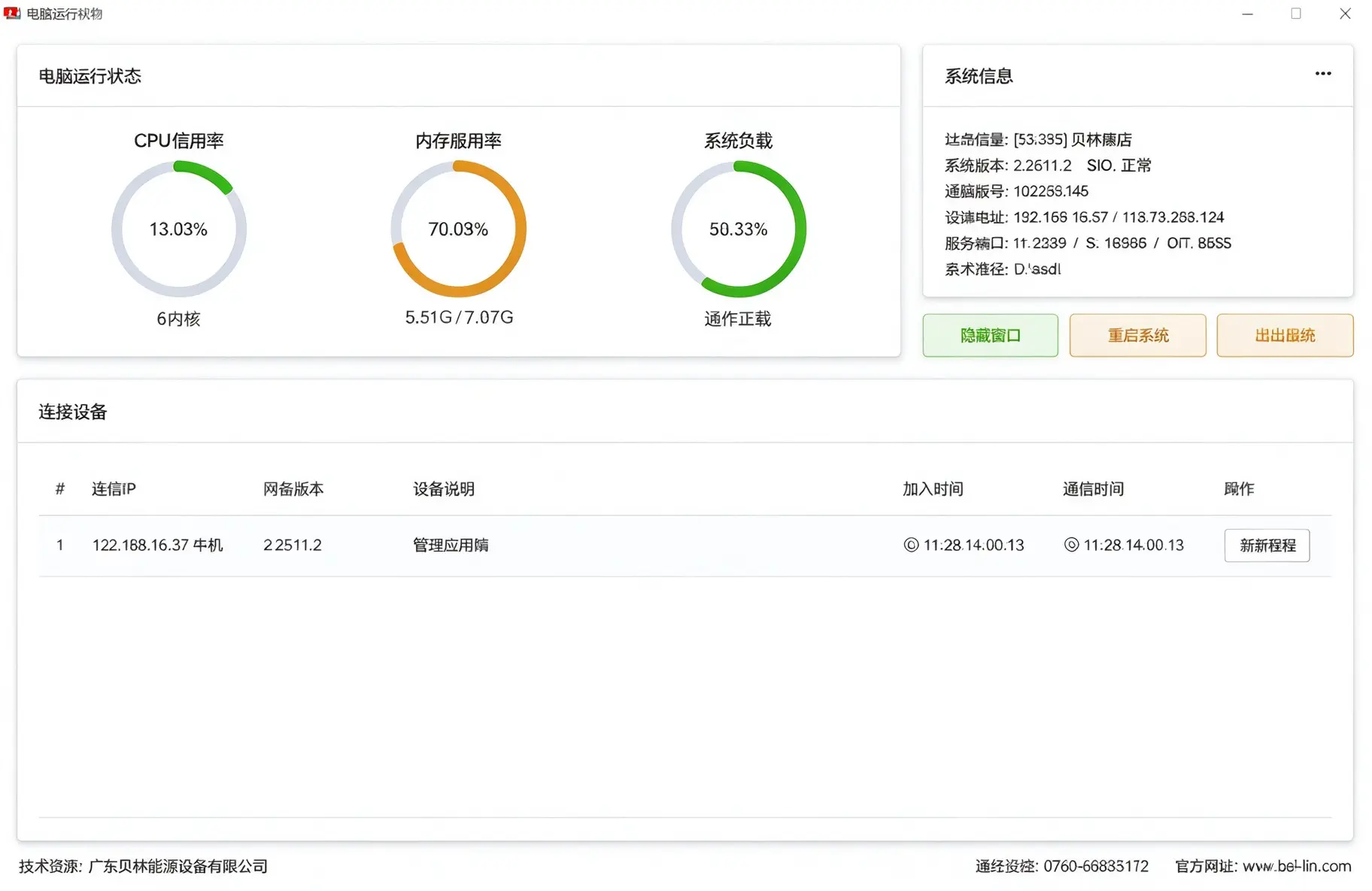
The screenshot below is the Beyi server monitoring dashboard. You can view:
- CPU utilization
- Memory usage
- System load
- Online device list
- Server running status
- Connected equipment information
This panel is very helpful. Gas station owners and maintenance technicians can judge system health status from it, and catch problems such as server lag, high memory usage or offline devices in time.
To summarize: The server is the brain of the system. The collection software “captures” data, the server “calculates” business rules, and the application client is for operation and visualization.
4. Application Client: Front Panel for Cashiers & Administrators
The application client is the operating interface that staff use every day. Cashiers finish fuel settlement and convenience store sales via this client. Administrators issue cards, set promotions, check inventory and generate reports on it.
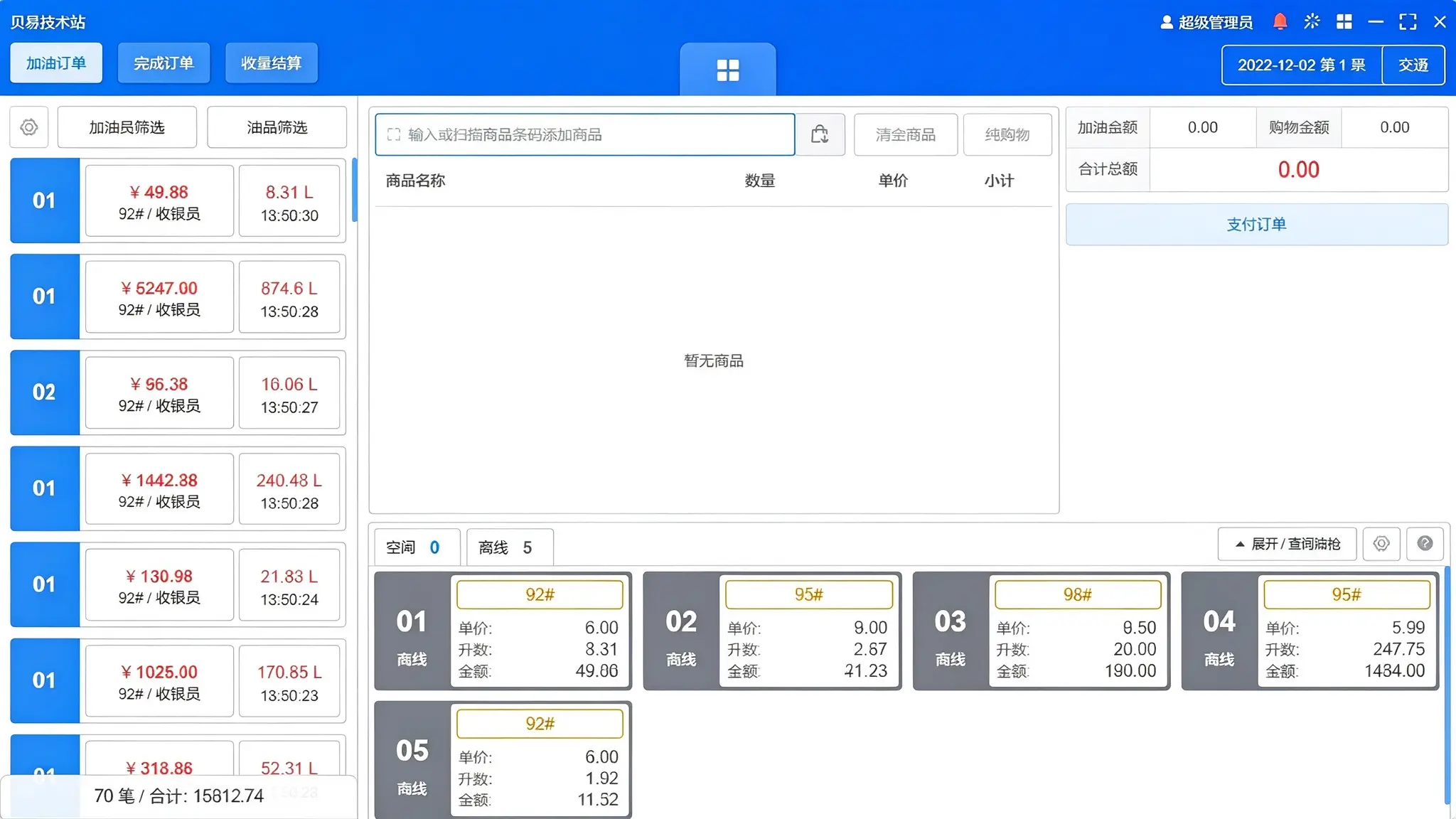
As shown in the screenshot, the Beyi client interface contains these core areas:
- Left sidebar: Nozzle list, fuel type and real-time fueling records
- Middle area: Order and commodity operation panel
- Right sidebar: Current order, payment info, receivable and paid amount
- Bottom shortcut bar: Convenience store goods, supporting combined settlement for fuel and retail products
Key features of the application client:
- User-friendly interface for fast learning
- Support simultaneous login of multiple computers connected to one server
- Role-based access control: cashiers and administrators have different function permissions
- Real-time synchronization of fueling, cashier and member data
- Integrated settlement for fuel sales and convenience store goods
How Do The Four Modules Work Together?
We have introduced each module separately. Now let’s walk through the complete data flow:
Fuel dispenser generates fueling data → Data collection software reads data in real time → Upload data to the server → Server calculates price rules, discounts, points and payment logic → Save all processed data into MySQL database → Application client displays nozzle status, order details and cashier results → Administrators check reports, member records and business statistics
Module Division Table
| Module | Core Function | Analogy |
|---|---|---|
| MySQL Database | Store all business data | Data warehouse |
| Data Collection Software | Collect real-time data from fuel dispensers | Messenger |
| Server Program | Process business logic & manage connected devices | Brain |
| Application Client | Operation portal for cashiers and managers | Operation Front Desk |
Why This Architecture Fits Private Gas Stations
For private gas stations, system stability and data accuracy matter more than fancy functions. The advantages of Beyi gas station management system architecture are listed below:
1. Multiple cashier computers work simultaneously
All terminals connect to one unified server. Every cashier station shares the same database and promotion rules, and data sync instantly.
2. Closed-loop data between fuel dispenser and cashier
Fuel data is captured by collection software, processed by server and stored into database. It avoids human entry mistakes and manual bookkeeping errors.
3. Clear permission management for better security
Permissions can be assigned by roles on the client. Cashiers only have settlement access, while only administrators can modify back-end settings, lowering the risk of misoperation.
4. Easy maintenance & fault diagnosis
Logs from collection software, server status records and client operation trails are all traceable. When communication failure, data delay or order error occurs, technicians can troubleshoot module by module.
Conclusion
Beyi Gas Station Management System is not merely a simple cashier software. It is a complete solution made up of MySQL database, data collection software, server program and application client.
Once you understand this architecture, gas station owners and maintenance staff can clearly know: Where data comes from, where it is processed, where it is stored, and why all front terminals sync in real time.
This knowledge lays the foundation for system installation, daily maintenance, fault troubleshooting and third-party integration that we will cover later.
In the next article, we will introduce the full installation and deployment guide of Beyi Gas Station Management System, including hardware preparation, installation sequence, database configuration, collection software setup, server activation and client login.
If you have any questions or want to get a customized solution for your gas station, feel free to contact us for more details.